


WAVES-14332845
Description
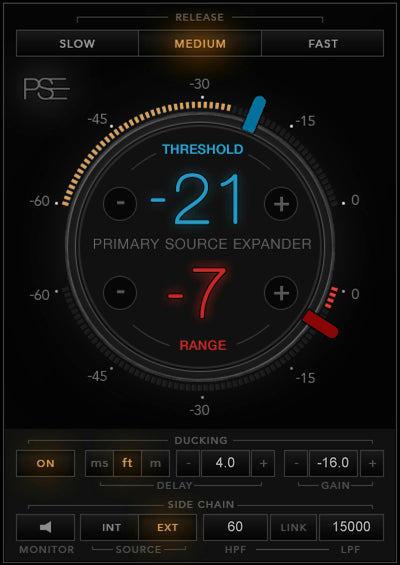
Mixing live shows is a rollercoaster ride where things constantly change. Mic bleed could be causing feedback that prevents you from turning up the PA. Or you may constantly need to mute background noise when a singer isn’t singing. Or maybe you need excellent isolation with a live multitrack recording. PSE is the answer to these and other live sound challenges.
It’s an easy-to-use optimized expander that solves most issues instantly—and allows you to handle even the toughest bleed problems. End Live Sound Mixing Nightmares Which vocal mic has bleed from the drums?! Why is feedback kicking in? Where’s all that hum coming from? Why do I have to keep turning mics down?!? Run your audio through PSE so you can stop running around solving problems—and concentrate on creative mixing.
Precision Sound Matters PSE keeps the music’s integrity by sending unwanted sounds smoothly into silence when a performer pauses. With precision expansion optimized for melodic sources like vocals guitars strings and more you can forget about troublesome noise gates. Just set Threshold and Range: PSE will smoothly attenuate anything below that threshold by the range level you’ve set.
Specs

 This product
Waves Primary Source Expander: Expander Plugin
WAVES
Rs. 4,003 |
 Kuassa EVE-AT4 Monitor Controller – Professional Audio Software & Plugin
KUASSA
Rs. 4,462 |
 Kuassa EVE-AT1 Monitor Controller – Professional Audio Software & Plugin
KUASSA
Rs. 4,462 |
 Kuassa Amplifikation Vermilion Amp Simulator – Professional Audio Software & Plugin
KUASSA
Rs. 4,462 | |
|---|---|---|---|---|
| Platform | Mac, PC | Mac, PC | Mac, PC | Mac, PC |
| OS Requirements - Mac | macOS Catalina 10.15, Big Sur 11, Monterey 12, Ventura 13, Sonoma 14 | Mac OSX 10.11 or later (64 Bit). | Mac OSX 10.11 or later (64 Bit). | Mac OSX 10.11 or later (64 Bit). |
| Hardware Requirements - Mac | Intel or Silicon Architecture, 8 GB RAM, 16 GB free disk space | Core2 Duo, or better (latest Intel i3 recommended), 4 GB RAM | Core2 Duo, or better (latest Intel i3 recommended), 4 GB RAM | Core2 Duo, or better (latest Intel i3 recommended), 4 GB RAM |
| OS Requirements - PC | Windows 10 64 bit and Windows 11 | Windows Vista or Later (64 bit) | Windows Vista or Later (64 bit) | Windows Vista or Later (64 bit) |
| Hardware Requirements - PC | X64 compatible Intel or AMD CPU, 8 GB RAM, 16 GB free disk space | Core2 Duo, or AMD Phenom ii X4 or better (latest Intel i3, AMD A4, or better is recommended), 4 GB RAM | Core2 Duo, or AMD Phenom ii X4 or better (latest Intel i3, AMD A4, or better is recommended), 4 GB RAM | Core2 Duo, or AMD Phenom ii X4 or better (latest Intel i3, AMD A4, or better is recommended), 4 GB RAM |
| Additional Compatibility | Minimum: 1024x768 Recommended: 1280x1024 / 1600x1024 USB displays are not supported as the primary display. Minimum: 1024x768 Recommended: 1280x1024 / 1600x1024 | Please note that this product is a plugin, a VST/VST3/AU/AAX compatible host/sequencer is needed to run this software | Please note that this product is a plugin, a VST/VST3/AU/AAX compatible host/sequencer is needed to run this software | Please note that this product is a plugin, a VST/VST3/AU/AAX compatible host/sequencer is needed to run this software |
| Plug-in Formats | — | VST-2, VST-3, AU, AAX | VST-2, VST-3, AU, AAX | VST-2, VST-3, AU, AAX |